---
title: Multiple frontend domains with separate backends
description: Set up multiple frontend domains with separate backends using OAuth2 authentication.
sidebar:
order: 2
---
## Overview
You can use the following guide if you have a single [**Authorization Service**](/authentication/unified-login/oauth2-basics#authorization-server) that multiple applications use.
In turn, each app has separate **`frontend`** and **`backend`** instances that serve from different domains.
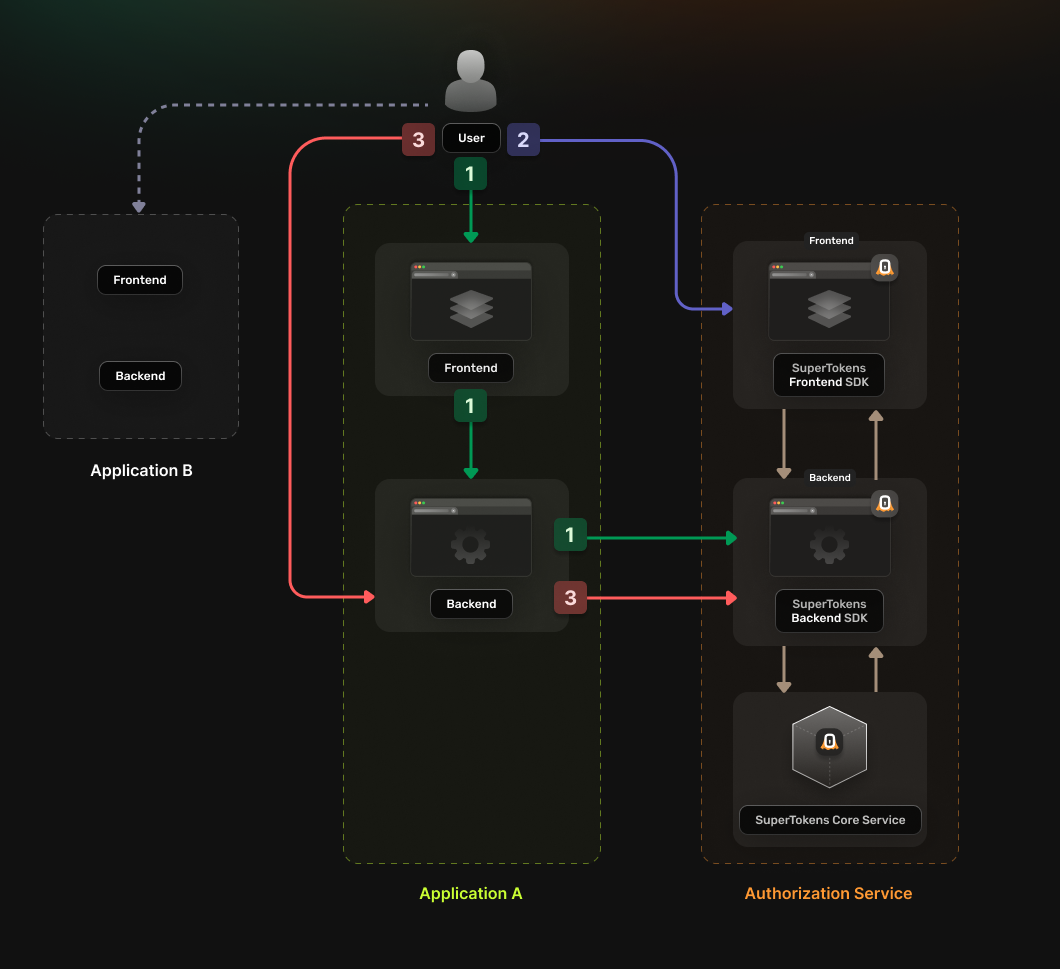
The authentication flow works in the following way:
1. **The User accesses the frontend app**
- The application `frontend` calls a login endpoint on the `backend` application.
- The `backend` application generates an `authorization` URL to the [**Authorization Service**](/authentication/unified-login/oauth2-basics#authorization-server) and redirects the user to it.
- The [**Authorization Service**](/authentication/unified-login/oauth2-basics#authorization-server) backend redirects the user to the login UI
2. **The User completes the login attempt**
- The [**Authorization Service**](/authentication/unified-login/oauth2-basics#authorization-server) backend redirects the user to a `callback URL` that includes the **Authorization Code**.
3. **The user accesses the callback URL**
- The Authorization Code and `state` are sent to the application backend.
- The backend verifies `state`, exchanges the Authorization Code, and keeps the OAuth tokens server-side.
- The backend rotates the application session and sends only an opaque session identifier in a cookie.
The frontend uses an opaque `HttpOnly`, `Secure`, appropriately `SameSite` application-session cookie to access its backend. OAuth access and refresh tokens never enter browser-readable storage.
 ## Before you start
:::info
Note that, if the *frontends* and *backends* are in different *subdomains*, you don't need to use *OAuth* and can instead use [session sharing across sub domains](/post-authentication/session-management/share-session-across-sub-domains).
:::
## Steps
### 1. Enable the Unified Login feature
Go to the [**SuperTokens.com SaaS Dashboard**](https://supertokens.com/dashboard), select the relevant **Managed** deployment, and open **Features**. Enable **Unified Login**. Changes are saved automatically.
### 2. Create the OAuth2 Clients
For each application, create a separate [**OAuth2 client**](/authentication/unified-login/oauth2-basics#client).
Call the **SuperTokens Core** API from a trusted administrative environment. Because each application backend performs the code exchange and can protect credentials, these are **confidential clients**. The examples below register `client_secret_basic`, which is appropriate for Go oauth2, `Authlib`, League OAuth2 Client with `HttpBasicAuthOptionProvider`, Spring Security, and ASP.NET Core. Never expose a client secret to frontend code, logs, URLs, or browser storage.
:::warning[passport-oauth2 requires a separately registered client]
passport-oauth2 1.8.0 sends `client_id` and `client_secret` in the token request body. For the Node.js Passport application, register its own client with `tokenEndpointAuthMethod: "client_secret_post"` instead of the `client_secret_basic` value shown below. Do not reuse that client or secret in another application.
:::
**Examples**
```bash
curl --location --request POST '/recipe/oauth/clients' \
--header 'api-key: ' \
--header 'Content-Type: application/json; charset=utf-8' \
--data '
{
"clientName": "",
"responseTypes": ["code"],
"grantTypes": ["authorization_code", "refresh_token"],
"tokenEndpointAuthMethod": "client_secret_basic",
"audience": [""],
"scope": "offline_access ",
"redirectUris": ["https:///oauth/callback"]
}
'
```
```tsx
const BASE_URL = "";
const API_KEY = "";
const url = `${BASE_URL}/recipe/oauth/clients`;
const options = {
method: "POST",
headers: {
"api-key": API_KEY,
"Content-Type": "application/json; charset=utf-8",
},
body: JSON.stringify({
clientName: "",
responseTypes: ["code"],
grantTypes: ["authorization_code", "refresh_token"],
tokenEndpointAuthMethod: "client_secret_basic",
audience: [""],
scope: "offline_access ",
redirectUris: ["https:///oauth/callback"],
}),
};
fetch(url, options)
.then((response) => response.json())
.then((json) => console.log(json))
.catch((err) => console.error(err));
```
```go
import (
"fmt"
"net/http"
"strings"
"io"
)
func main() {
baseUrl := ""
apiKey := ""
url := fmt.Sprintf("%s/recipe/oauth/clients", baseUrl)
payload := `{
"clientName": "",
"responseTypes": ["code"],
"grantTypes": ["authorization_code", "refresh_token"],
"tokenEndpointAuthMethod": "client_secret_basic",
"audience": [""],
"scope": "offline_access ",
"redirectUris": ["https:///oauth/callback"]
}`
req, _ := http.NewRequest("POST", url, strings.NewReader(payload))
req.Header.Add("accept", "application/json")
req.Header.Add("api-key", apiKey)
req.Header.Add("content-type", "application/json")
res, _ := http.DefaultClient.Do(req)
defer res.Body.Close()
body, _ := io.ReadAll(res.Body)
fmt.Println(string(body))
}
```
```python
import requests
from typing import Dict, Any
BASE_URL = ""
API_KEY = ""
url = f"{BASE_URL}/recipe/oauth/clients"
payload: Dict[str, Any] ={
"clientName": "",
"responseTypes": ["code"],
"grantTypes": ["authorization_code", "refresh_token"],
"tokenEndpointAuthMethod": "client_secret_basic",
"audience": [""],
"scope": "offline_access ",
"redirectUris": ["https:///oauth/callback"]
}
headers = {
"api-key": API_KEY,
"Content-Type": "application/json",
}
response = requests.post(url, json=payload, headers=headers)
print(response.json())
```
**Details**
Creates an OAuth2 client
**Authorization**: Set the `api-key` header to the value of your **SuperTokens** Core API key.
## Request
### Body Schema
| Name | Type | Description | Required | Default Value |
|--------------------------------------------|--------------------------|-------------------------------------------------------------------------------------------------------------------------------------------------------------------------------------------------|----------|---------------|
| `clientName` | `string` | A human-readable name of the client used for identification. | Yes | - |
| `grantTypes` | `array` of `GrantType` | The grant types that the Client uses. | Yes | - |
| `redirectUris` | `array` of `string` | Exact redirect URIs registered for the client. Wildcards are not supported. | Yes | - |
| `audience` | `array` of `string` | Resource-server identifiers allowed in access tokens. | No | - |
| `scope` | `string` | String containing a space-separated list of scope values (as described in Section 3.3 of OAuth 2.0 [RFC6749]) that the client can use when requesting access tokens. Include the `offline_access` scope to exchange OAuth2 Refresh Tokens for OAuth2 Access Tokens | No | "" |
| `responseTypes` | `array` of `ResponseType` | The types of responses your client expects from the **Authorization Server** | No | - |
| `tokenEndpointAuthMethod` | `enum`(`"client_secret_basic"`, `"client_secret_post"`, `"private_key_jwt"`, `"none"`) | The requested client authentication method | No | `client_secret_basic` |
| `authorizationCodeGrantAccessTokenLifespan` | `Time Duration` | OAuth2 Access Token lifespan when using the Authorization Code grant flow. | No | `"1h"` |
| `authorizationCodeGrantIdTokenLifespan` | `Time Duration` | OAuth2 ID Token lifespan when using the Authorization Code grant flow. | No | `"1h"` |
| `authorizationCodeGrantRefreshTokenLifespan`| `Time Duration` | OAuth2 Refresh Token lifespan when using the Authorization Code grant flow. | If `refreshTokenGrantRefreshTokenLifespan` is also set | `"30d"` |
| `refreshTokenGrantRefreshTokenLifespan` | `Time Duration` | OAuth2 Refresh Token lifespan when using the Refresh Token grant flow. Must match `authorizationCodeGrantRefreshTokenLifespan`. | If `authorizationCodeGrantRefreshTokenLifespan` is also set | `"30d"` |
| `clientCredentialsGrantAccessTokenLifespan` | `Time Duration` | OAuth2 Access Token lifespan when using the Client Credentials grant flow. | No | `"1h"` |
| `enableRefreshTokenRotation` | `boolean` | Indicates that the refresh token is a one-time use. Set it to `false` to disable refresh token rotation. | No | `true` |
#### GrantType
- `authorization_code`: allows exchanging the Authorization Code for an OAuth2 Access Token.
- `refresh_token`: allows exchanging the OAuth2 Refresh Token for an OAuth2 Access Token.
- `client_credentials`: allows the client to directly request an OAuth2 Access Token by authenticating itself with the Authorization Server using its own client credentials.
#### TokenEndpointAuthMethod
- `client_secret_basic`: uses the HTTP Basic Authentication scheme to authenticate the client.
- `client_secret_post`: uses the HTTP `POST` Authentication scheme to authenticate the client.
- `private_key_jwt`: uses JSON Web Tokens (JWT) to authenticate the client.
- `none`: indicates that the process of obtaining an OAuth2 Access Token does not use the client secret. Used for public clients (native apps or mobile apps).
#### ResponseType
- `code`: Indicates that the Client receives an Authorization Code that it exchanges for an OAuth2 Access Token.
- `id_token`: Indicates that the Client expects an ID Token.
#### Time Duration
A string value that signifies time duration in milliseconds, seconds, minutes, or hours: `"2000ms"`, `"60s"`, `"30m"`, `"1h"`.
### Example
```bash
curl -X POST /recipe/oauth/clients \
-H "Content-Type: application/json" \
-H "api-key: " \
-d '{
"clientName": "",
"responseTypes": ["code"],
"grantTypes": ["authorization_code", "refresh_token"],
"tokenEndpointAuthMethod": "client_secret_basic",
"audience": [""],
"scope": "offline_access ",
"redirectUris": ["https:///oauth/callback"]
}'
```
## Response
### 200
The client has been successfully created.
### Relevant response fields
The response includes the persisted client configuration, including the fields below.
| Property | Type | Description |
|-------------|----------------------------------|-----------------------------------------------|
| `clientName` | `string` | The name of the client. |
| `clientId` | `string` | Unique identifier for the client. |
| `clientSecret` | `string` | Client secret for a confidential client. Omitted for a public client. Treat it as a credential and keep it on a trusted backend. |
| `redirectUris` | `array` of `string` | The URLs used for redirection. |
| `audience` | `array` of `string` | Value used to identify for whom a token is issued. The created client can generate access token only for the specified audiences. |
| `scope` | `string` | A space-separated string of scopes that the client can request. |
| `responseTypes` | `array` of `string` | Registered response types. |
| `grantTypes` | `array` of `string` | Registered grant types. |
| `tokenEndpointAuthMethod` | `string` | Token endpoint authentication method. |
| `enableRefreshTokenRotation` | `boolean` | Whether refresh token rotation is enabled. |
#### Example
```json
{
"clientName": "",
"clientId": "",
"clientSecret": "",
"tokenEndpointAuthMethod": "client_secret_basic",
"audience": [""],
"redirectUris": ["https:///oauth/callback"],
"scope": "offline_access "
}
```
:::warning[Protect OAuth client credentials]
Core persists the client configuration and encrypts confidential client secrets at rest. Store any returned client secret in a secret manager and expose it only to the application backend. Public clients do not receive or use a client secret.
:::
### 3. Set up your Authorization Service backend
In your [**Authorization Service**](/authentication/unified-login/oauth2-basics#authorization-server) you need to initialize the **OAuth2Provider** recipe.
The recipe exposes the endpoints needed for enabling the [**OAuth 2.0**](/authentication/unified-login/oauth2-basics) flow.
Update the `supertokens.init` call to include the `OAuth2Provider` recipe.
Add the import statement for the recipe and update the recipe list with the new initialization step.
:::warning[At the moment there is no support for creating OAuth2 providers in the Go SDK.]
:::
```typescript
import supertokens from "supertokens-node";
import EmailPassword from "supertokens-node/recipe/emailpassword";
import OAuth2Provider from "supertokens-node/recipe/oauth2provider";
supertokens.init({
supertokens: {
connectionURI: "...",
apiKey: "...",
},
appInfo: {
appName: "...",
apiDomain: "...",
websiteDomain: "...",
},
recipeList: [EmailPassword.init(), OAuth2Provider.init()],
});
```
```python
from supertokens_python import init, InputAppInfo, SupertokensConfig
from supertokens_python.recipe import emailpassword, oauth2provider
init(
app_info=InputAppInfo(
app_name="...",
api_domain="...",
website_domain="...",
),
framework="fastapi",
supertokens_config=SupertokensConfig(
connection_uri="...",
api_key="..."
),
recipe_list=[
emailpassword.init(),
oauth2provider.init(),
],
)
```
### 4. Configure the Authorization Service frontend
#### 4.1 Initialize the recipe
Add the import statement for the new recipe and update the list of recipes to also include the new initialization.
Update the `AuthComponent` to include the `OAuth2Provider` recipe.
You need to add a new item in the `recipeList` array.
Update the `AuthView` component to include the `OAuth2Provider` recipe.
You need to add a new item in the `recipeList` array, inside the `supertokensUIInit` call.
```tsx
import OAuth2Provider from "supertokens-auth-react/recipe/oauth2provider";
import EmailPassword from "supertokens-auth-react/recipe/emailpassword";
import SuperTokens from "supertokens-auth-react";
SuperTokens.init({
appInfo: {
appName: "...",
apiDomain: "...",
websiteDomain: "...",
},
recipeList: [EmailPassword.init(), OAuth2Provider.init()],
});
```
```tsx title="/app/auth/auth.component.ts"
import { init as supertokensUIInit } from "supertokens-auth-react";
import supertokensUIOAuth2Provider from "supertokens-auth-react/recipe/oauth2provider";
import { Component, OnDestroy, AfterViewInit, Renderer2, Inject } from "@angular/core";
import { DOCUMENT } from "@angular/common";
@Component({
selector: "app-auth",
template: '',
})
export class AuthComponent implements OnDestroy, AfterViewInit {
constructor(
private renderer: Renderer2,
@Inject(DOCUMENT) private document: Document,
) {}
ngAfterViewInit() {
this.loadScript("https://cdn.jsdelivr.net/gh/supertokens/prebuiltui@vX.Y.Z/build/static/js/main.test.js");
}
ngOnDestroy() {
// Remove the script when the component is destroyed
const script = this.document.getElementById("supertokens-script");
if (script) {
script.remove();
}
}
private loadScript(src: string) {
const script = this.renderer.createElement("script");
script.type = "text/javascript";
script.src = src;
script.id = "supertokens-script";
script.onload = () => {
supertokensUIInit({
appInfo: {
appName: "",
apiDomain: "",
websiteDomain: "",
apiBasePath: "/auth",
websiteBasePath: "/auth",
},
recipeList: [
// Don't forget to also include the other recipes that you are already using
supertokensUIOAuth2Provider.init(),
],
});
};
this.renderer.appendChild(this.document.body, script);
}
}
```
```html
import {init as supertokensUIInit} from "supertokens-auth-react"; import supertokensUIOAuth2Provider from
"supertokens-auth-react/recipe/oauth2provider";
```
#### 4.2 Include the pre-built UI in the rendering tree.
```tsx
import React from "react";
import { BrowserRouter, Routes } from "react-router-dom";
import SuperTokens, { SuperTokensWrapper } from "supertokens-auth-react";
import { getSuperTokensRoutesForReactRouterDom } from "supertokens-auth-react/ui";
import { OAuth2ProviderPreBuiltUI } from "supertokens-auth-react/recipe/oauth2provider/prebuiltui";
import { EmailPasswordPreBuiltUI } from "supertokens-auth-react/recipe/emailpassword/prebuiltui";
import * as reactRouterDom from "react-router-dom";
class App extends React.Component {
render() {
return (
{/*This renders the login UI on the /auth route*/}
{getSuperTokensRoutesForReactRouterDom(reactRouterDom, [EmailPasswordPreBuiltUI, OAuth2ProviderPreBuiltUI])}
{/*Your app routes*/}
);
}
}
```
```tsx
import React from "react";
import { OAuth2ProviderPreBuiltUI } from "supertokens-auth-react/recipe/oauth2provider/prebuiltui";
import { EmailPasswordPreBuiltUI } from "supertokens-auth-react/recipe/emailpassword/prebuiltui";
import SuperTokens, { SuperTokensWrapper } from "supertokens-auth-react";
import { canHandleRoute, getRoutingComponent } from "supertokens-auth-react/ui";
class App extends React.Component {
render() {
if (canHandleRoute([EmailPasswordPreBuiltUI, OAuth2ProviderPreBuiltUI])) {
// This renders the login UI on the /auth route
return getRoutingComponent([EmailPasswordPreBuiltUI, OAuth2ProviderPreBuiltUI]);
}
return {/*Your app*/};
}
}
```
The user interface that you are going to build should respect this flow:
1. **A user accesses your application and tries to login.**
It's up to you how you want to handle this.
They can click a button to login or you can directly start the login flow.
2. **They get redirected to the Authorization Service Backend **
A **OAuth2/OpenID Connect (OIDC)** library can execute this action.
Check the previous guides for information on what you could use.
3. **The Authorization Service Backend redirects them to the Authorization Service Frontend login page.**
The page URL contains a `loginChallenge` parameter that keeps track of the login attempt.
Besides that, the URL can also include a `forceFreshAuth` parameter.
As the name suggests, this should force the login UI to be visible even though the user has an existing valid session.
This guide shows you how to handle this.
4. **The Authorization Service Frontend renders the login UI and the user performs the login action.**
The login UI should render based on instructions that are specific to each authentication method which you are using.
The additional thing that you have to do here is to consider the `forceFreshAuth` parameter.
5. **The Authorization Service Frontend redirects the user back to the Authorization Service Backend **
After the user submits the login form, you need to redirect them to a specific route that sends them to the original application.
From here, the authentication flow completes.
Let's see how you can actually implement this UI.
#### 4.1 Configure the redirection URLs
As it has hinted in the previous section, the **Authorization Service Backend** sends the user to different pages from the **Authorization Service Frontend**, based on the action that needs execution.
The default values for these routes are:
- The login page maps to `/auth` (this is also the place where a user ends up after logout)
- The token refresh page maps to `/auth/try-refresh`
- The logout page maps to `/auth/logout`
If you want to change these routes, you need to add a custom override.
:::info[This override needs addition to the **Authorization Service Backend**.]
:::
:::warning[At the moment, there is no support for creating OAuth2 providers in the Go SDK.]
:::
```tsx
import OAuth2Provider from "supertokens-node/recipe/oauth2provider";
OAuth2Provider.init({
override: {
functions: (originalFunctions) => ({
...originalFunctions,
getFrontendRedirectionURL: async (input) => {
const websiteDomain = "";
const websiteBasePath = "/auth";
if (input.type === "login") {
const queryParams = new URLSearchParams({
loginChallenge: input.loginChallenge,
});
if (input.hint !== undefined) {
queryParams.set("hint", input.hint);
}
if (input.tenantId !== undefined) {
queryParams.set("tenantId", input.tenantId);
}
if (input.forceFreshAuth) {
queryParams.set("forceFreshAuth", "true");
}
return `/auth?${queryParams.toString()}`;
} else if (input.type === "try-refresh") {
return `/auth/try-refresh?loginChallenge=${input.loginChallenge}`;
} else if (input.type === "post-logout-fallback") {
return `/auth`;
} else if (input.type === "logout-confirmation") {
return `/auth/oauth/logout?logoutChallenge=${input.logoutChallenge}`;
}
return `/auth`;
},
}),
},
});
```
#### 4.2 Handle the forceFreshAuth parameter
Sometimes, even though there is an existing valid session in the **Authorization Service Frontend**, the requesting **Client** might force a new login attempt.
The `forceFreshAuth` parameter shows this.
When the login page renders, you also need to check for this parameter. You are doing this to know if you need to show the login UI.
Here is an example of how you can evaluate this case.
```tsx
import Session from "supertokens-web-js/recipe/session";
async function shouldLogin() {
const urlParams = new URLSearchParams(window.location.search);
const forceFreshAuth = urlParams.get("forceFreshAuth") as string;
if (forceFreshAuth === "true") return true;
return !(await Session.doesSessionExist());
}
```
:::info[Multi Tenancy]
If you are using multi-tenancy, you also need to keep track of the `tenantId` query parameter and pass it between the **Authorization Service Frontend** pages.
:::
#### 4.3 Complete the login attempt
After the user submits the login form, you need to redirect them to a specific route to complete the **OAuth 2.0** flow.
The following code sample shows you how to determine which URL to use.
:::warning
For mobile apps, you need to reuse the web authentication flow. Check this [guide](/authentication/unified-login/quickstart-guides/reuse-website-login) for more information.
:::
```tsx
import OAuth2Provider from "supertokens-web-js/recipe/oauth2provider";
async function getInitialRedirectionURL() {
const urlParams = new URLSearchParams(window.location.search);
const loginChallenge = urlParams.get("loginChallenge") as string;
const redirectionResponse = await OAuth2Provider.getRedirectURLToContinueOAuthFlow({ loginChallenge });
if (redirectionResponse.status === "OK") {
return redirectionResponse.frontendRedirectTo;
}
}
```
#### 4.4 Add the token refresh page
To have support for token refreshing, you need to add a new page to your application.
The path should correspond to the one outlined during the first step.
When the user ends up on this page, you need to use the `Session` recipe to perform the refresh action.
Then they need redirection to a page from your application.
Here's a code sample that shows you how to do this.
:::warning
For mobile apps, you need to reuse the web authentication flow. Check this [guide](/authentication/unified-login/quickstart-guides/reuse-website-login) for more information.
:::
```tsx
import OAuth2Provider from "supertokens-web-js/recipe/oauth2provider";
import Session from "supertokens-web-js/recipe/session";
async function refreshToken() {
await Session.attemptRefreshingSession();
const urlParams = new URLSearchParams(window.location.search);
const loginChallenge = urlParams.get("loginChallenge") as string;
const redirectionResponse = await OAuth2Provider.getRedirectURLToContinueOAuthFlow({ loginChallenge });
if (redirectionResponse.status === "OK") {
window.location.href = redirectionResponse.frontendRedirectTo;
}
}
```
#### 4.5 Add the logout page
You need to add a logout page that users access when they want to end their session.
The path should correspond to the one outlined during the first step.
The logout action should first ask the user for confirmation.
If the confirmation passes, then you can call the recipe function.
Based on the final response you can redirect the user to the provided redirection URL.
:::warning
For mobile apps, you need to reuse the web authentication flow. Check this [guide](/authentication/unified-login/quickstart-guides/reuse-website-login) for more information.
:::
```tsx
import OAuth2Provider from "supertokens-web-js/recipe/oauth2provider";
async function logout() {
const confirmation = confirm("Are you sure that you want to log out?");
if (!confirmation) return;
const urlParams = new URLSearchParams(window.location.search);
const logoutChallenge = urlParams.get("logoutChallenge") as string;
const redirectResponse = await OAuth2Provider.logOut({ logoutChallenge });
window.location.href = redirectResponse.frontendRedirectTo;
}
```
### 5. Set up session handling in each application
In each of your individual `applications` you need to set up logic for handling the **OAuth 2.0** authentication flow.
Use a framework OAuth 2.0/OIDC login middleware rather than implementing the protocol manually. The authorization endpoint is `/auth/oauth/auth`, and the token endpoint is `/auth/oauth/token`. Each registered callback must exactly match one of the client's `redirectUris`.
A secure implementation must:
1. Generate a high-entropy `state`, bind it to the initiating browser session, and verify it exactly before code exchange. Use PKCE as defense in depth where the library supports it.
2. For OIDC, request `openid`, generate and verify `nonce`, and validate the ID token signature, issuer, audience, expiry, and nonce.
3. Keep OAuth access and refresh tokens in a server-side session store. After callback, rotate the application session identifier to prevent session fixation.
4. Return only an opaque session identifier in an `HttpOnly`, `Secure`, appropriately `SameSite` cookie. Never return OAuth tokens in browser-readable cookies, JavaScript storage, or URLs.
5. Preserve the selected `tenantId` through authorization, callback, and the resulting application session.
With [passport-oauth2](https://www.passportjs.org/packages/passport-oauth2/), state protection and PKCE are opt-in. Configure both. Install server-side Express session middleware before Passport; do not use a client-side cookie session store. This example uses the separately registered `client_secret_post` client described in step 2.
```javascript
const CLIENT_ID = "";
const EXPECTED_AUDIENCE = "";
const EXPECTED_ISSUER = "";
const REQUIRED_SCOPES = [""];
const INTROSPECTION_URL = "/auth/oauth/introspect";
class SuperTokensOAuth2Strategy extends OAuth2Strategy {
authorizationParams(options) {
return { tenant_id: options.tenantId };
}
}
async function introspectAndValidateTenant(accessToken, expectedTenant) {
const response = await fetch(INTROSPECTION_URL, {
method: "POST",
headers: { "content-type": "application/x-www-form-urlencoded" },
body: new URLSearchParams({ token: accessToken, scope: REQUIRED_SCOPES.join(" ") }),
});
if (!response.ok) throw new Error("OAuth introspection failed");
const tokenInfo = await response.json();
const audiences = Array.isArray(tokenInfo.aud) ? tokenInfo.aud : [tokenInfo.aud];
if (
tokenInfo.active !== true ||
tokenInfo.tId !== expectedTenant ||
tokenInfo.client_id !== CLIENT_ID ||
tokenInfo.iss !== EXPECTED_ISSUER ||
!audiences.includes(EXPECTED_AUDIENCE)
) {
throw new Error("OAuth token does not match the login transaction");
}
}
app.use(
session({
secret: mustGetEnv("APPLICATION_SESSION_SECRET"),
store: serverSideSessionStore,
resave: false,
saveUninitialized: false,
cookie: { httpOnly: true, secure: true, sameSite: "lax" },
}),
);
app.use(passport.initialize());
app.use(passport.session());
passport.use(
new SuperTokensOAuth2Strategy(
{
authorizationURL: "/auth/oauth/auth",
tokenURL: "/auth/oauth/token",
clientID: CLIENT_ID,
clientSecret: mustGetEnv("OAUTH_CLIENT_SECRET"),
callbackURL: "https:///oauth/callback",
scope: "offline_access ",
state: true,
pkce: true,
passReqToCallback: true,
},
async (req, accessToken, refreshToken, params, profile, done) => {
try {
const transaction = req.session.oauthTransaction;
delete req.session.oauthTransaction;
if (transaction === undefined) throw new Error("OAuth transaction missing");
await introspectAndValidateTenant(accessToken, transaction.tenantId);
const user = await resolveUserFromOAuthTokens(accessToken, refreshToken);
done(null, user, {
oauthTokens: { accessToken, refreshToken },
tenantId: transaction.tenantId,
});
} catch (error) {
done(error);
}
},
),
);
app.get("/login", (req, res, next) => {
const tenantId = resolveAllowedTenant(req);
req.session.oauthTransaction = { tenantId };
passport.authenticate("oauth2", { tenantId })(req, res, next);
});
app.get("/oauth/callback", (req, res, next) => {
passport.authenticate("oauth2", { session: false }, (error, user, info) => {
if (error || !user) return next(error ?? new Error("OAuth login failed"));
if (!info?.oauthTokens || typeof info.tenantId !== "string") {
return next(new Error("OAuth transaction result missing"));
}
req.session.regenerate((regenerateError) => {
if (regenerateError) return next(regenerateError);
req.logIn(user, (loginError) => {
if (loginError) return next(loginError);
applicationSessionStore.set(req.sessionID, {
tenantId: info.tenantId,
oauthTokens: info.oauthTokens,
});
res.redirect("/");
});
});
})(req, res, next);
});
```
passport-oauth2 generates and consumes its state and PKCE verifier in the initiating `req.session`. The separate `oauthTransaction` binds the allowlisted tenant to that same session, and `authorizationParams` sends it as the released `tenant_id` authorization parameter. The trusted introspection endpoint validates signature, expiry, revocation, and required scopes before the example compares the released `tId`, issuer, client, and audience fields. The rotated opaque application session stores the validated tenant and tokens server-side.
Use [golang.org/x/oauth2](https://pkg.go.dev/golang.org/x/oauth2) with a one-time, server-side transaction store. The store must key each transaction by the initiating application session ID; `Consume` must atomically read and delete it.
```go
import (
"context"
"crypto/rand"
"crypto/subtle"
"encoding/base64"
"encoding/json"
"errors"
"io"
"net/http"
"net/url"
"strings"
"golang.org/x/oauth2"
)
type OAuthTransaction struct {
State string
Verifier string
TenantID string
}
type Audience []string
func (audience *Audience) UnmarshalJSON(data []byte) error {
var single string
if err := json.Unmarshal(data, &single); err == nil {
*audience = Audience{single}
return nil
}
var multiple []string
if err := json.Unmarshal(data, &multiple); err != nil {
return errors.New("invalid OAuth audience")
}
*audience = multiple
return nil
}
func (audience Audience) Contains(expected string) bool {
for _, value := range audience {
if value == expected {
return true
}
}
return false
}
type IntrospectionResponse struct {
Active bool `json:"active"`
Audience Audience `json:"aud"`
TenantID string `json:"tId"`
ClientID string `json:"client_id"`
Issuer string `json:"iss"`
}
type AppSession struct {
TenantID string
Token *oauth2.Token
}
type OAuthTransactionStore interface {
Put(sessionID string, transaction OAuthTransaction) error
Consume(sessionID string) (OAuthTransaction, bool)
}
type AppSessionStore interface {
Put(sessionID string, session AppSession) error
}
type OAuthApp struct {
Config *oauth2.Config
IntrospectionURL string
ExpectedIssuer string
ExpectedAudience string
RequiredScopes []string
Transactions OAuthTransactionStore
Sessions AppSessionStore
ResolveAllowedTenant func(*http.Request) (string, error)
ApplicationSessionID func(*http.Request) string
RotateApplicationSession func(http.ResponseWriter, *http.Request) (string, error)
}
func randomURLSafeToken(size int) (string, error) {
value := make([]byte, size)
if _, err := rand.Read(value); err != nil {
return "", err
}
return base64.RawURLEncoding.EncodeToString(value), nil
}
func (app *OAuthApp) introspectAndValidateTenant(ctx context.Context, accessToken, expectedTenant string) error {
form := url.Values{
"token": {accessToken},
"scope": {strings.Join(app.RequiredScopes, " ")},
}
request, err := http.NewRequestWithContext(ctx, http.MethodPost, app.IntrospectionURL, strings.NewReader(form.Encode()))
if err != nil {
return err
}
request.Header.Set("content-type", "application/x-www-form-urlencoded")
response, err := http.DefaultClient.Do(request)
if err != nil {
return err
}
defer response.Body.Close()
if response.StatusCode != http.StatusOK {
return errors.New("OAuth introspection failed")
}
var tokenInfo IntrospectionResponse
if err := json.NewDecoder(io.LimitReader(response.Body, 1<<20)).Decode(&tokenInfo); err != nil {
return err
}
if !tokenInfo.Active || !tokenInfo.Audience.Contains(app.ExpectedAudience) || tokenInfo.TenantID != expectedTenant || tokenInfo.ClientID != app.Config.ClientID || tokenInfo.Issuer != app.ExpectedIssuer {
return errors.New("OAuth token does not match the login transaction")
}
return nil
}
func (app *OAuthApp) Login(w http.ResponseWriter, r *http.Request) {
state, err := randomURLSafeToken(32)
if err != nil {
http.Error(w, "login unavailable", http.StatusInternalServerError)
return
}
tenantID, err := app.ResolveAllowedTenant(r)
if err != nil {
http.Error(w, "invalid tenant", http.StatusBadRequest)
return
}
verifier := oauth2.GenerateVerifier()
transaction := OAuthTransaction{State: state, Verifier: verifier, TenantID: tenantID}
if err := app.Transactions.Put(app.ApplicationSessionID(r), transaction); err != nil {
http.Error(w, "login unavailable", http.StatusInternalServerError)
return
}
authURL := app.Config.AuthCodeURL(
state,
oauth2.S256ChallengeOption(verifier),
oauth2.SetAuthURLParam("tenant_id", tenantID),
)
http.Redirect(w, r, authURL, http.StatusFound)
}
func (app *OAuthApp) Callback(w http.ResponseWriter, r *http.Request) {
transaction, ok := app.Transactions.Consume(app.ApplicationSessionID(r))
providedState := r.URL.Query().Get("state")
if !ok || subtle.ConstantTimeCompare([]byte(transaction.State), []byte(providedState)) != 1 {
http.Error(w, "invalid OAuth state", http.StatusBadRequest)
return
}
token, err := app.Config.Exchange(r.Context(), r.URL.Query().Get("code"), oauth2.VerifierOption(transaction.Verifier))
if err != nil {
http.Error(w, "code exchange failed", http.StatusBadRequest)
return
}
if err := app.introspectAndValidateTenant(r.Context(), token.AccessToken, transaction.TenantID); err != nil {
http.Error(w, "token validation failed", http.StatusUnauthorized)
return
}
newSessionID, err := app.RotateApplicationSession(w, r)
if err != nil {
http.Error(w, "session creation failed", http.StatusInternalServerError)
return
}
if err := app.Sessions.Put(newSessionID, AppSession{TenantID: transaction.TenantID, Token: token}); err != nil {
http.Error(w, "session creation failed", http.StatusInternalServerError)
return
}
http.Redirect(w, r, "/", http.StatusFound)
}
```
Create an `OAuthApp` with your OAuth client configuration, server-side stores, and application session helpers, then register its `Login` and `Callback` methods as HTTP handlers. `ResolveAllowedTenant` must reject tenants outside your allowlist. `ApplicationSessionID` must identify the initiating server-side session, and `RotateApplicationSession` must invalidate the old session and issue a new opaque session ID. `Transactions.Consume` must atomically read and delete an unexpired transaction; return `false` for missing or expired transactions.
Set `IntrospectionURL` to `/auth/oauth/introspect`, `ExpectedIssuer` to the exact configured issuer, `ExpectedAudience` to this resource server, and `RequiredScopes` to its scopes. Core 12.1.1 introspection can return `aud` as a JSON string or array; `Audience.UnmarshalJSON` handles both and the callback requires the configured audience before creating a session. The released `tenant_id` authorization parameter selects the tenant, and introspection returns its signed `tId`. Only the rotated opaque session ID reaches the browser.
Use [Authlib](https://docs.authlib.org/) with a one-time server-side transaction store. These functions are framework-agnostic; connect `redirect`, `request_url`, and the session helpers to your framework.
```python
import secrets
import requests
from authlib.common.security import generate_token
from authlib.integrations.requests_client import OAuth2Session
def introspect_and_validate_tenant(access_token: str, expected_tenant: str) -> None:
response = requests.post(
INTROSPECTION_URL,
data={"token": access_token, "scope": " ".join(REQUIRED_SCOPES)},
timeout=5,
)
response.raise_for_status()
token_info = response.json()
audiences = token_info.get("aud", [])
if isinstance(audiences, str):
audiences = [audiences]
if (
token_info.get("active") is not True
or token_info.get("tId") != expected_tenant
or token_info.get("client_id") != CLIENT_ID
or token_info.get("iss") != EXPECTED_ISSUER
or EXPECTED_AUDIENCE not in audiences
):
raise ValueError("OAuth token does not match the login transaction")
def login():
client = OAuth2Session(
CLIENT_ID,
CLIENT_SECRET,
token_endpoint_auth_method="client_secret_basic",
scope=SCOPES,
redirect_uri=CALLBACK_URL,
code_challenge_method="S256",
)
verifier = generate_token(48)
tenant_id = resolve_allowed_tenant()
authorization_url, state = client.create_authorization_url(
AUTHORIZATION_URL,
code_verifier=verifier,
tenant_id=tenant_id,
)
transaction_store.put(
application_session_id(),
{"state": state, "verifier": verifier, "tenant_id": tenant_id},
)
return redirect(authorization_url)
def callback():
# consume atomically reads and deletes the initiating session's transaction
transaction = transaction_store.consume(application_session_id())
provided_state = request_query_parameter("state") or ""
if transaction is None or not secrets.compare_digest(
transaction["state"], provided_state
):
raise InvalidOAuthState()
client = OAuth2Session(
CLIENT_ID,
CLIENT_SECRET,
token_endpoint_auth_method="client_secret_basic",
state=transaction["state"],
redirect_uri=CALLBACK_URL,
code_challenge_method="S256",
)
token = client.fetch_token(
TOKEN_URL,
authorization_response=request_url(),
code_verifier=transaction["verifier"],
)
introspect_and_validate_tenant(token["access_token"], transaction["tenant_id"])
new_session_id = rotate_application_session()
application_session_store.put(
new_session_id,
{"tenant_id": transaction["tenant_id"], "oauth_token": token},
)
return redirect("/")
```
Set `INTROSPECTION_URL` to `/auth/oauth/introspect`, `EXPECTED_ISSUER` to the exact configured issuer, and configure the expected client, audience, and required scopes. Authlib sends the released `tenant_id` authorization parameter. Core introspection validates signature, expiry, revocation, and requested scopes and returns the signed `tId`; only the rotated opaque session ID is sent to the browser.
Use [League OAuth2 Client](https://oauth2-client.thephpleague.com/usage/) with a server-side application session and one-time transaction store.
```php
$clientSecret = getenv('OAUTH_CLIENT_SECRET');
if ($clientSecret === false) {
throw new RuntimeException('OAUTH_CLIENT_SECRET is required');
}
$httpClient = new GuzzleHttp\Client(['timeout' => 5]);
$provider = new League\OAuth2\Client\Provider\GenericProvider(
[
'clientId' => CLIENT_ID,
'clientSecret' => $clientSecret,
'redirectUri' => 'https:///oauth/callback',
'urlAuthorize' => '/auth/oauth/auth',
'urlAccessToken' => '/auth/oauth/token',
'urlResourceOwnerDetails' => '/auth/oauth/userinfo',
'scopes' => ['offline_access', '', ''],
'scopeSeparator' => ' ',
'pkceMethod' => League\OAuth2\Client\Provider\GenericProvider::PKCE_METHOD_S256,
],
[
'httpClient' => $httpClient,
'optionProvider' => new League\OAuth2\Client\OptionProvider\HttpBasicAuthOptionProvider(),
],
);
if ($requestPath === '/login') {
$tenantId = resolveAllowedTenant();
$authorizationUrl = $provider->getAuthorizationUrl([
'tenant_id' => $tenantId,
]);
$transactionStore->put(session_id(), [
'state' => $provider->getState(),
'pkceCode' => $provider->getPkceCode(),
'tenantId' => $tenantId,
]);
header('Location: ' . $authorizationUrl);
exit;
}
if ($requestPath !== '/oauth/callback') {
throw new RuntimeException('Not found');
}
// consume atomically reads and deletes the initiating session's transaction
$transaction = $transactionStore->consume(session_id());
$providedState = $_GET['state'] ?? '';
if ($transaction === null || !hash_equals($transaction['state'], $providedState)) {
throw new RuntimeException('Invalid OAuth state');
}
if (isset($_GET['error']) || !isset($_GET['code'])) {
throw new RuntimeException('OAuth authorization failed');
}
$provider->setPkceCode($transaction['pkceCode']);
$token = $provider->getAccessToken('authorization_code', [
'code' => $_GET['code'],
]);
$introspectionResponse = $httpClient->request('POST', INTROSPECTION_URL, [
'form_params' => [
'token' => $token->getToken(),
'scope' => implode(' ', REQUIRED_SCOPES),
],
]);
$tokenInfo = json_decode(
(string) $introspectionResponse->getBody(),
true,
512,
JSON_THROW_ON_ERROR,
);
$audiences = is_array($tokenInfo['aud'] ?? null)
? $tokenInfo['aud']
: [$tokenInfo['aud'] ?? null];
if (
($tokenInfo['active'] ?? false) !== true
|| ($tokenInfo['tId'] ?? null) !== $transaction['tenantId']
|| ($tokenInfo['client_id'] ?? null) !== CLIENT_ID
|| ($tokenInfo['iss'] ?? null) !== EXPECTED_ISSUER
|| !in_array(EXPECTED_AUDIENCE, $audiences, true)
) {
throw new RuntimeException('OAuth token does not match the login transaction');
}
session_regenerate_id(true);
$applicationSessionStore->put(session_id(), [
'tenantId' => $transaction['tenantId'],
'oauthToken' => $token,
]);
header('Location: /');
exit;
```
Set `INTROSPECTION_URL` to `/auth/oauth/introspect`, `EXPECTED_ISSUER` to the exact configured issuer, and configure the expected audience and required scopes. League sends the released `tenant_id` authorization parameter. Core introspection validates signature, expiry, revocation, and requested scopes and returns signed `tId`; only the rotated opaque session ID reaches the browser.
You can use the [Spring Security](https://github.com/spring-projects/spring-security) library.
Follow these [instructions](https://docs.spring.io/spring-security/reference/servlet/oauth2/index.html#oauth2-client-log-users-in) and implement it in your `backend`.
You can determine the configuration parameters based on the response received in **step 2**.
- `client-id` corresponds to `clientId`
- `client-secret` corresponds to `clientSecret`
- `scope` corresponds to `scope`
- `issuer-uri` corresponds to `/auth`
Use an `OAuth2AuthorizationRequestResolver` to add the allowlisted tenant as the `tenant_id` authorization parameter and retain it in the server-side `AuthorizationRequestRepository` transaction. After callback, call `/auth/oauth/introspect`, require `active`, the configured scopes/client/audience/issuer, and exact `tId`, then persist that tenant and the tokens in the rotated server-side application session.
Use ASP.NET Core's OpenID Connect authentication middleware to handle the authorization callback, correlation cookie, `state`, `nonce`, token validation, and application-session rotation. Configure its authority as `/auth`, set `ClientId` and `ClientSecret` from the confidential client, and set `CallbackPath` to the path of an exact `redirectUris` entry. Store tokens server-side rather than in the authentication cookie.
In `OnRedirectToIdentityProvider`, add the allowlisted tenant to `AuthenticationProperties.Items` and send it as `ProtocolMessage.SetParameter("tenant_id", tenantId)`. After callback, introspect the access token at `/auth/oauth/introspect`; require `active`, the configured scopes/client/audience/issuer, and exact `tId`. Put that tenant and the tokens in the rotated server-side application session, never in the browser cookie.
:::info
If you want to use the [**OAuth2 Refresh Tokens**](/authentication/unified-login/oauth2-basics#oauth2-refresh-token) make sure to include the `offline_access` scope during the initialization step.
:::
### 6. Update the login flow in your frontend applications
In your `frontend` applications you need to add a login action that directs the user to the authentication page.
The user should first redirect to the `backend` authentication endpoint defined during the previous step.
There the `backend` generates a safe `authorization` URL using the **OAuth2** library and then redirects the user there.
After login, the Authorization Service redirects the user to the backend callback. The backend verifies the bound `state` (and OIDC `nonce` when applicable), exchanges the code, rotates the application session, and sets only the hardened opaque session cookie described above.
### 7. Test the new authentication flow
With everything set up, you can test your login flow.
Use the setup created in the previous step to check if the authentication flow completes without any issues.
## Before you start
:::info
Note that, if the *frontends* and *backends* are in different *subdomains*, you don't need to use *OAuth* and can instead use [session sharing across sub domains](/post-authentication/session-management/share-session-across-sub-domains).
:::
## Steps
### 1. Enable the Unified Login feature
Go to the [**SuperTokens.com SaaS Dashboard**](https://supertokens.com/dashboard), select the relevant **Managed** deployment, and open **Features**. Enable **Unified Login**. Changes are saved automatically.
### 2. Create the OAuth2 Clients
For each application, create a separate [**OAuth2 client**](/authentication/unified-login/oauth2-basics#client).
Call the **SuperTokens Core** API from a trusted administrative environment. Because each application backend performs the code exchange and can protect credentials, these are **confidential clients**. The examples below register `client_secret_basic`, which is appropriate for Go oauth2, `Authlib`, League OAuth2 Client with `HttpBasicAuthOptionProvider`, Spring Security, and ASP.NET Core. Never expose a client secret to frontend code, logs, URLs, or browser storage.
:::warning[passport-oauth2 requires a separately registered client]
passport-oauth2 1.8.0 sends `client_id` and `client_secret` in the token request body. For the Node.js Passport application, register its own client with `tokenEndpointAuthMethod: "client_secret_post"` instead of the `client_secret_basic` value shown below. Do not reuse that client or secret in another application.
:::
**Examples**
```bash
curl --location --request POST '/recipe/oauth/clients' \
--header 'api-key: ' \
--header 'Content-Type: application/json; charset=utf-8' \
--data '
{
"clientName": "",
"responseTypes": ["code"],
"grantTypes": ["authorization_code", "refresh_token"],
"tokenEndpointAuthMethod": "client_secret_basic",
"audience": [""],
"scope": "offline_access ",
"redirectUris": ["https:///oauth/callback"]
}
'
```
```tsx
const BASE_URL = "";
const API_KEY = "";
const url = `${BASE_URL}/recipe/oauth/clients`;
const options = {
method: "POST",
headers: {
"api-key": API_KEY,
"Content-Type": "application/json; charset=utf-8",
},
body: JSON.stringify({
clientName: "",
responseTypes: ["code"],
grantTypes: ["authorization_code", "refresh_token"],
tokenEndpointAuthMethod: "client_secret_basic",
audience: [""],
scope: "offline_access ",
redirectUris: ["https:///oauth/callback"],
}),
};
fetch(url, options)
.then((response) => response.json())
.then((json) => console.log(json))
.catch((err) => console.error(err));
```
```go
import (
"fmt"
"net/http"
"strings"
"io"
)
func main() {
baseUrl := ""
apiKey := ""
url := fmt.Sprintf("%s/recipe/oauth/clients", baseUrl)
payload := `{
"clientName": "",
"responseTypes": ["code"],
"grantTypes": ["authorization_code", "refresh_token"],
"tokenEndpointAuthMethod": "client_secret_basic",
"audience": [""],
"scope": "offline_access ",
"redirectUris": ["https:///oauth/callback"]
}`
req, _ := http.NewRequest("POST", url, strings.NewReader(payload))
req.Header.Add("accept", "application/json")
req.Header.Add("api-key", apiKey)
req.Header.Add("content-type", "application/json")
res, _ := http.DefaultClient.Do(req)
defer res.Body.Close()
body, _ := io.ReadAll(res.Body)
fmt.Println(string(body))
}
```
```python
import requests
from typing import Dict, Any
BASE_URL = ""
API_KEY = ""
url = f"{BASE_URL}/recipe/oauth/clients"
payload: Dict[str, Any] ={
"clientName": "",
"responseTypes": ["code"],
"grantTypes": ["authorization_code", "refresh_token"],
"tokenEndpointAuthMethod": "client_secret_basic",
"audience": [""],
"scope": "offline_access ",
"redirectUris": ["https:///oauth/callback"]
}
headers = {
"api-key": API_KEY,
"Content-Type": "application/json",
}
response = requests.post(url, json=payload, headers=headers)
print(response.json())
```
**Details**
Creates an OAuth2 client
**Authorization**: Set the `api-key` header to the value of your **SuperTokens** Core API key.
## Request
### Body Schema
| Name | Type | Description | Required | Default Value |
|--------------------------------------------|--------------------------|-------------------------------------------------------------------------------------------------------------------------------------------------------------------------------------------------|----------|---------------|
| `clientName` | `string` | A human-readable name of the client used for identification. | Yes | - |
| `grantTypes` | `array` of `GrantType` | The grant types that the Client uses. | Yes | - |
| `redirectUris` | `array` of `string` | Exact redirect URIs registered for the client. Wildcards are not supported. | Yes | - |
| `audience` | `array` of `string` | Resource-server identifiers allowed in access tokens. | No | - |
| `scope` | `string` | String containing a space-separated list of scope values (as described in Section 3.3 of OAuth 2.0 [RFC6749]) that the client can use when requesting access tokens. Include the `offline_access` scope to exchange OAuth2 Refresh Tokens for OAuth2 Access Tokens | No | "" |
| `responseTypes` | `array` of `ResponseType` | The types of responses your client expects from the **Authorization Server** | No | - |
| `tokenEndpointAuthMethod` | `enum`(`"client_secret_basic"`, `"client_secret_post"`, `"private_key_jwt"`, `"none"`) | The requested client authentication method | No | `client_secret_basic` |
| `authorizationCodeGrantAccessTokenLifespan` | `Time Duration` | OAuth2 Access Token lifespan when using the Authorization Code grant flow. | No | `"1h"` |
| `authorizationCodeGrantIdTokenLifespan` | `Time Duration` | OAuth2 ID Token lifespan when using the Authorization Code grant flow. | No | `"1h"` |
| `authorizationCodeGrantRefreshTokenLifespan`| `Time Duration` | OAuth2 Refresh Token lifespan when using the Authorization Code grant flow. | If `refreshTokenGrantRefreshTokenLifespan` is also set | `"30d"` |
| `refreshTokenGrantRefreshTokenLifespan` | `Time Duration` | OAuth2 Refresh Token lifespan when using the Refresh Token grant flow. Must match `authorizationCodeGrantRefreshTokenLifespan`. | If `authorizationCodeGrantRefreshTokenLifespan` is also set | `"30d"` |
| `clientCredentialsGrantAccessTokenLifespan` | `Time Duration` | OAuth2 Access Token lifespan when using the Client Credentials grant flow. | No | `"1h"` |
| `enableRefreshTokenRotation` | `boolean` | Indicates that the refresh token is a one-time use. Set it to `false` to disable refresh token rotation. | No | `true` |
#### GrantType
- `authorization_code`: allows exchanging the Authorization Code for an OAuth2 Access Token.
- `refresh_token`: allows exchanging the OAuth2 Refresh Token for an OAuth2 Access Token.
- `client_credentials`: allows the client to directly request an OAuth2 Access Token by authenticating itself with the Authorization Server using its own client credentials.
#### TokenEndpointAuthMethod
- `client_secret_basic`: uses the HTTP Basic Authentication scheme to authenticate the client.
- `client_secret_post`: uses the HTTP `POST` Authentication scheme to authenticate the client.
- `private_key_jwt`: uses JSON Web Tokens (JWT) to authenticate the client.
- `none`: indicates that the process of obtaining an OAuth2 Access Token does not use the client secret. Used for public clients (native apps or mobile apps).
#### ResponseType
- `code`: Indicates that the Client receives an Authorization Code that it exchanges for an OAuth2 Access Token.
- `id_token`: Indicates that the Client expects an ID Token.
#### Time Duration
A string value that signifies time duration in milliseconds, seconds, minutes, or hours: `"2000ms"`, `"60s"`, `"30m"`, `"1h"`.
### Example
```bash
curl -X POST /recipe/oauth/clients \
-H "Content-Type: application/json" \
-H "api-key: " \
-d '{
"clientName": "",
"responseTypes": ["code"],
"grantTypes": ["authorization_code", "refresh_token"],
"tokenEndpointAuthMethod": "client_secret_basic",
"audience": [""],
"scope": "offline_access ",
"redirectUris": ["https:///oauth/callback"]
}'
```
## Response
### 200
The client has been successfully created.
### Relevant response fields
The response includes the persisted client configuration, including the fields below.
| Property | Type | Description |
|-------------|----------------------------------|-----------------------------------------------|
| `clientName` | `string` | The name of the client. |
| `clientId` | `string` | Unique identifier for the client. |
| `clientSecret` | `string` | Client secret for a confidential client. Omitted for a public client. Treat it as a credential and keep it on a trusted backend. |
| `redirectUris` | `array` of `string` | The URLs used for redirection. |
| `audience` | `array` of `string` | Value used to identify for whom a token is issued. The created client can generate access token only for the specified audiences. |
| `scope` | `string` | A space-separated string of scopes that the client can request. |
| `responseTypes` | `array` of `string` | Registered response types. |
| `grantTypes` | `array` of `string` | Registered grant types. |
| `tokenEndpointAuthMethod` | `string` | Token endpoint authentication method. |
| `enableRefreshTokenRotation` | `boolean` | Whether refresh token rotation is enabled. |
#### Example
```json
{
"clientName": "",
"clientId": "",
"clientSecret": "",
"tokenEndpointAuthMethod": "client_secret_basic",
"audience": [""],
"redirectUris": ["https:///oauth/callback"],
"scope": "offline_access "
}
```
:::warning[Protect OAuth client credentials]
Core persists the client configuration and encrypts confidential client secrets at rest. Store any returned client secret in a secret manager and expose it only to the application backend. Public clients do not receive or use a client secret.
:::
### 3. Set up your Authorization Service backend
In your [**Authorization Service**](/authentication/unified-login/oauth2-basics#authorization-server) you need to initialize the **OAuth2Provider** recipe.
The recipe exposes the endpoints needed for enabling the [**OAuth 2.0**](/authentication/unified-login/oauth2-basics) flow.
Update the `supertokens.init` call to include the `OAuth2Provider` recipe.
Add the import statement for the recipe and update the recipe list with the new initialization step.
:::warning[At the moment there is no support for creating OAuth2 providers in the Go SDK.]
:::
```typescript
import supertokens from "supertokens-node";
import EmailPassword from "supertokens-node/recipe/emailpassword";
import OAuth2Provider from "supertokens-node/recipe/oauth2provider";
supertokens.init({
supertokens: {
connectionURI: "...",
apiKey: "...",
},
appInfo: {
appName: "...",
apiDomain: "...",
websiteDomain: "...",
},
recipeList: [EmailPassword.init(), OAuth2Provider.init()],
});
```
```python
from supertokens_python import init, InputAppInfo, SupertokensConfig
from supertokens_python.recipe import emailpassword, oauth2provider
init(
app_info=InputAppInfo(
app_name="...",
api_domain="...",
website_domain="...",
),
framework="fastapi",
supertokens_config=SupertokensConfig(
connection_uri="...",
api_key="..."
),
recipe_list=[
emailpassword.init(),
oauth2provider.init(),
],
)
```
### 4. Configure the Authorization Service frontend
#### 4.1 Initialize the recipe
Add the import statement for the new recipe and update the list of recipes to also include the new initialization.
Update the `AuthComponent` to include the `OAuth2Provider` recipe.
You need to add a new item in the `recipeList` array.
Update the `AuthView` component to include the `OAuth2Provider` recipe.
You need to add a new item in the `recipeList` array, inside the `supertokensUIInit` call.
```tsx
import OAuth2Provider from "supertokens-auth-react/recipe/oauth2provider";
import EmailPassword from "supertokens-auth-react/recipe/emailpassword";
import SuperTokens from "supertokens-auth-react";
SuperTokens.init({
appInfo: {
appName: "...",
apiDomain: "...",
websiteDomain: "...",
},
recipeList: [EmailPassword.init(), OAuth2Provider.init()],
});
```
```tsx title="/app/auth/auth.component.ts"
import { init as supertokensUIInit } from "supertokens-auth-react";
import supertokensUIOAuth2Provider from "supertokens-auth-react/recipe/oauth2provider";
import { Component, OnDestroy, AfterViewInit, Renderer2, Inject } from "@angular/core";
import { DOCUMENT } from "@angular/common";
@Component({
selector: "app-auth",
template: '',
})
export class AuthComponent implements OnDestroy, AfterViewInit {
constructor(
private renderer: Renderer2,
@Inject(DOCUMENT) private document: Document,
) {}
ngAfterViewInit() {
this.loadScript("https://cdn.jsdelivr.net/gh/supertokens/prebuiltui@vX.Y.Z/build/static/js/main.test.js");
}
ngOnDestroy() {
// Remove the script when the component is destroyed
const script = this.document.getElementById("supertokens-script");
if (script) {
script.remove();
}
}
private loadScript(src: string) {
const script = this.renderer.createElement("script");
script.type = "text/javascript";
script.src = src;
script.id = "supertokens-script";
script.onload = () => {
supertokensUIInit({
appInfo: {
appName: "",
apiDomain: "",
websiteDomain: "",
apiBasePath: "/auth",
websiteBasePath: "/auth",
},
recipeList: [
// Don't forget to also include the other recipes that you are already using
supertokensUIOAuth2Provider.init(),
],
});
};
this.renderer.appendChild(this.document.body, script);
}
}
```
```html
import {init as supertokensUIInit} from "supertokens-auth-react"; import supertokensUIOAuth2Provider from
"supertokens-auth-react/recipe/oauth2provider";
```
#### 4.2 Include the pre-built UI in the rendering tree.
```tsx
import React from "react";
import { BrowserRouter, Routes } from "react-router-dom";
import SuperTokens, { SuperTokensWrapper } from "supertokens-auth-react";
import { getSuperTokensRoutesForReactRouterDom } from "supertokens-auth-react/ui";
import { OAuth2ProviderPreBuiltUI } from "supertokens-auth-react/recipe/oauth2provider/prebuiltui";
import { EmailPasswordPreBuiltUI } from "supertokens-auth-react/recipe/emailpassword/prebuiltui";
import * as reactRouterDom from "react-router-dom";
class App extends React.Component {
render() {
return (
{/*This renders the login UI on the /auth route*/}
{getSuperTokensRoutesForReactRouterDom(reactRouterDom, [EmailPasswordPreBuiltUI, OAuth2ProviderPreBuiltUI])}
{/*Your app routes*/}
);
}
}
```
```tsx
import React from "react";
import { OAuth2ProviderPreBuiltUI } from "supertokens-auth-react/recipe/oauth2provider/prebuiltui";
import { EmailPasswordPreBuiltUI } from "supertokens-auth-react/recipe/emailpassword/prebuiltui";
import SuperTokens, { SuperTokensWrapper } from "supertokens-auth-react";
import { canHandleRoute, getRoutingComponent } from "supertokens-auth-react/ui";
class App extends React.Component {
render() {
if (canHandleRoute([EmailPasswordPreBuiltUI, OAuth2ProviderPreBuiltUI])) {
// This renders the login UI on the /auth route
return getRoutingComponent([EmailPasswordPreBuiltUI, OAuth2ProviderPreBuiltUI]);
}
return {/*Your app*/};
}
}
```
The user interface that you are going to build should respect this flow:
1. **A user accesses your application and tries to login.**
It's up to you how you want to handle this.
They can click a button to login or you can directly start the login flow.
2. **They get redirected to the Authorization Service Backend **
A **OAuth2/OpenID Connect (OIDC)** library can execute this action.
Check the previous guides for information on what you could use.
3. **The Authorization Service Backend redirects them to the Authorization Service Frontend login page.**
The page URL contains a `loginChallenge` parameter that keeps track of the login attempt.
Besides that, the URL can also include a `forceFreshAuth` parameter.
As the name suggests, this should force the login UI to be visible even though the user has an existing valid session.
This guide shows you how to handle this.
4. **The Authorization Service Frontend renders the login UI and the user performs the login action.**
The login UI should render based on instructions that are specific to each authentication method which you are using.
The additional thing that you have to do here is to consider the `forceFreshAuth` parameter.
5. **The Authorization Service Frontend redirects the user back to the Authorization Service Backend **
After the user submits the login form, you need to redirect them to a specific route that sends them to the original application.
From here, the authentication flow completes.
Let's see how you can actually implement this UI.
#### 4.1 Configure the redirection URLs
As it has hinted in the previous section, the **Authorization Service Backend** sends the user to different pages from the **Authorization Service Frontend**, based on the action that needs execution.
The default values for these routes are:
- The login page maps to `/auth` (this is also the place where a user ends up after logout)
- The token refresh page maps to `/auth/try-refresh`
- The logout page maps to `/auth/logout`
If you want to change these routes, you need to add a custom override.
:::info[This override needs addition to the **Authorization Service Backend**.]
:::
:::warning[At the moment, there is no support for creating OAuth2 providers in the Go SDK.]
:::
```tsx
import OAuth2Provider from "supertokens-node/recipe/oauth2provider";
OAuth2Provider.init({
override: {
functions: (originalFunctions) => ({
...originalFunctions,
getFrontendRedirectionURL: async (input) => {
const websiteDomain = "";
const websiteBasePath = "/auth";
if (input.type === "login") {
const queryParams = new URLSearchParams({
loginChallenge: input.loginChallenge,
});
if (input.hint !== undefined) {
queryParams.set("hint", input.hint);
}
if (input.tenantId !== undefined) {
queryParams.set("tenantId", input.tenantId);
}
if (input.forceFreshAuth) {
queryParams.set("forceFreshAuth", "true");
}
return `/auth?${queryParams.toString()}`;
} else if (input.type === "try-refresh") {
return `/auth/try-refresh?loginChallenge=${input.loginChallenge}`;
} else if (input.type === "post-logout-fallback") {
return `/auth`;
} else if (input.type === "logout-confirmation") {
return `/auth/oauth/logout?logoutChallenge=${input.logoutChallenge}`;
}
return `/auth`;
},
}),
},
});
```
#### 4.2 Handle the forceFreshAuth parameter
Sometimes, even though there is an existing valid session in the **Authorization Service Frontend**, the requesting **Client** might force a new login attempt.
The `forceFreshAuth` parameter shows this.
When the login page renders, you also need to check for this parameter. You are doing this to know if you need to show the login UI.
Here is an example of how you can evaluate this case.
```tsx
import Session from "supertokens-web-js/recipe/session";
async function shouldLogin() {
const urlParams = new URLSearchParams(window.location.search);
const forceFreshAuth = urlParams.get("forceFreshAuth") as string;
if (forceFreshAuth === "true") return true;
return !(await Session.doesSessionExist());
}
```
:::info[Multi Tenancy]
If you are using multi-tenancy, you also need to keep track of the `tenantId` query parameter and pass it between the **Authorization Service Frontend** pages.
:::
#### 4.3 Complete the login attempt
After the user submits the login form, you need to redirect them to a specific route to complete the **OAuth 2.0** flow.
The following code sample shows you how to determine which URL to use.
:::warning
For mobile apps, you need to reuse the web authentication flow. Check this [guide](/authentication/unified-login/quickstart-guides/reuse-website-login) for more information.
:::
```tsx
import OAuth2Provider from "supertokens-web-js/recipe/oauth2provider";
async function getInitialRedirectionURL() {
const urlParams = new URLSearchParams(window.location.search);
const loginChallenge = urlParams.get("loginChallenge") as string;
const redirectionResponse = await OAuth2Provider.getRedirectURLToContinueOAuthFlow({ loginChallenge });
if (redirectionResponse.status === "OK") {
return redirectionResponse.frontendRedirectTo;
}
}
```
#### 4.4 Add the token refresh page
To have support for token refreshing, you need to add a new page to your application.
The path should correspond to the one outlined during the first step.
When the user ends up on this page, you need to use the `Session` recipe to perform the refresh action.
Then they need redirection to a page from your application.
Here's a code sample that shows you how to do this.
:::warning
For mobile apps, you need to reuse the web authentication flow. Check this [guide](/authentication/unified-login/quickstart-guides/reuse-website-login) for more information.
:::
```tsx
import OAuth2Provider from "supertokens-web-js/recipe/oauth2provider";
import Session from "supertokens-web-js/recipe/session";
async function refreshToken() {
await Session.attemptRefreshingSession();
const urlParams = new URLSearchParams(window.location.search);
const loginChallenge = urlParams.get("loginChallenge") as string;
const redirectionResponse = await OAuth2Provider.getRedirectURLToContinueOAuthFlow({ loginChallenge });
if (redirectionResponse.status === "OK") {
window.location.href = redirectionResponse.frontendRedirectTo;
}
}
```
#### 4.5 Add the logout page
You need to add a logout page that users access when they want to end their session.
The path should correspond to the one outlined during the first step.
The logout action should first ask the user for confirmation.
If the confirmation passes, then you can call the recipe function.
Based on the final response you can redirect the user to the provided redirection URL.
:::warning
For mobile apps, you need to reuse the web authentication flow. Check this [guide](/authentication/unified-login/quickstart-guides/reuse-website-login) for more information.
:::
```tsx
import OAuth2Provider from "supertokens-web-js/recipe/oauth2provider";
async function logout() {
const confirmation = confirm("Are you sure that you want to log out?");
if (!confirmation) return;
const urlParams = new URLSearchParams(window.location.search);
const logoutChallenge = urlParams.get("logoutChallenge") as string;
const redirectResponse = await OAuth2Provider.logOut({ logoutChallenge });
window.location.href = redirectResponse.frontendRedirectTo;
}
```
### 5. Set up session handling in each application
In each of your individual `applications` you need to set up logic for handling the **OAuth 2.0** authentication flow.
Use a framework OAuth 2.0/OIDC login middleware rather than implementing the protocol manually. The authorization endpoint is `/auth/oauth/auth`, and the token endpoint is `/auth/oauth/token`. Each registered callback must exactly match one of the client's `redirectUris`.
A secure implementation must:
1. Generate a high-entropy `state`, bind it to the initiating browser session, and verify it exactly before code exchange. Use PKCE as defense in depth where the library supports it.
2. For OIDC, request `openid`, generate and verify `nonce`, and validate the ID token signature, issuer, audience, expiry, and nonce.
3. Keep OAuth access and refresh tokens in a server-side session store. After callback, rotate the application session identifier to prevent session fixation.
4. Return only an opaque session identifier in an `HttpOnly`, `Secure`, appropriately `SameSite` cookie. Never return OAuth tokens in browser-readable cookies, JavaScript storage, or URLs.
5. Preserve the selected `tenantId` through authorization, callback, and the resulting application session.
With [passport-oauth2](https://www.passportjs.org/packages/passport-oauth2/), state protection and PKCE are opt-in. Configure both. Install server-side Express session middleware before Passport; do not use a client-side cookie session store. This example uses the separately registered `client_secret_post` client described in step 2.
```javascript
const CLIENT_ID = "";
const EXPECTED_AUDIENCE = "";
const EXPECTED_ISSUER = "";
const REQUIRED_SCOPES = [""];
const INTROSPECTION_URL = "/auth/oauth/introspect";
class SuperTokensOAuth2Strategy extends OAuth2Strategy {
authorizationParams(options) {
return { tenant_id: options.tenantId };
}
}
async function introspectAndValidateTenant(accessToken, expectedTenant) {
const response = await fetch(INTROSPECTION_URL, {
method: "POST",
headers: { "content-type": "application/x-www-form-urlencoded" },
body: new URLSearchParams({ token: accessToken, scope: REQUIRED_SCOPES.join(" ") }),
});
if (!response.ok) throw new Error("OAuth introspection failed");
const tokenInfo = await response.json();
const audiences = Array.isArray(tokenInfo.aud) ? tokenInfo.aud : [tokenInfo.aud];
if (
tokenInfo.active !== true ||
tokenInfo.tId !== expectedTenant ||
tokenInfo.client_id !== CLIENT_ID ||
tokenInfo.iss !== EXPECTED_ISSUER ||
!audiences.includes(EXPECTED_AUDIENCE)
) {
throw new Error("OAuth token does not match the login transaction");
}
}
app.use(
session({
secret: mustGetEnv("APPLICATION_SESSION_SECRET"),
store: serverSideSessionStore,
resave: false,
saveUninitialized: false,
cookie: { httpOnly: true, secure: true, sameSite: "lax" },
}),
);
app.use(passport.initialize());
app.use(passport.session());
passport.use(
new SuperTokensOAuth2Strategy(
{
authorizationURL: "/auth/oauth/auth",
tokenURL: "/auth/oauth/token",
clientID: CLIENT_ID,
clientSecret: mustGetEnv("OAUTH_CLIENT_SECRET"),
callbackURL: "https:///oauth/callback",
scope: "offline_access ",
state: true,
pkce: true,
passReqToCallback: true,
},
async (req, accessToken, refreshToken, params, profile, done) => {
try {
const transaction = req.session.oauthTransaction;
delete req.session.oauthTransaction;
if (transaction === undefined) throw new Error("OAuth transaction missing");
await introspectAndValidateTenant(accessToken, transaction.tenantId);
const user = await resolveUserFromOAuthTokens(accessToken, refreshToken);
done(null, user, {
oauthTokens: { accessToken, refreshToken },
tenantId: transaction.tenantId,
});
} catch (error) {
done(error);
}
},
),
);
app.get("/login", (req, res, next) => {
const tenantId = resolveAllowedTenant(req);
req.session.oauthTransaction = { tenantId };
passport.authenticate("oauth2", { tenantId })(req, res, next);
});
app.get("/oauth/callback", (req, res, next) => {
passport.authenticate("oauth2", { session: false }, (error, user, info) => {
if (error || !user) return next(error ?? new Error("OAuth login failed"));
if (!info?.oauthTokens || typeof info.tenantId !== "string") {
return next(new Error("OAuth transaction result missing"));
}
req.session.regenerate((regenerateError) => {
if (regenerateError) return next(regenerateError);
req.logIn(user, (loginError) => {
if (loginError) return next(loginError);
applicationSessionStore.set(req.sessionID, {
tenantId: info.tenantId,
oauthTokens: info.oauthTokens,
});
res.redirect("/");
});
});
})(req, res, next);
});
```
passport-oauth2 generates and consumes its state and PKCE verifier in the initiating `req.session`. The separate `oauthTransaction` binds the allowlisted tenant to that same session, and `authorizationParams` sends it as the released `tenant_id` authorization parameter. The trusted introspection endpoint validates signature, expiry, revocation, and required scopes before the example compares the released `tId`, issuer, client, and audience fields. The rotated opaque application session stores the validated tenant and tokens server-side.
Use [golang.org/x/oauth2](https://pkg.go.dev/golang.org/x/oauth2) with a one-time, server-side transaction store. The store must key each transaction by the initiating application session ID; `Consume` must atomically read and delete it.
```go
import (
"context"
"crypto/rand"
"crypto/subtle"
"encoding/base64"
"encoding/json"
"errors"
"io"
"net/http"
"net/url"
"strings"
"golang.org/x/oauth2"
)
type OAuthTransaction struct {
State string
Verifier string
TenantID string
}
type Audience []string
func (audience *Audience) UnmarshalJSON(data []byte) error {
var single string
if err := json.Unmarshal(data, &single); err == nil {
*audience = Audience{single}
return nil
}
var multiple []string
if err := json.Unmarshal(data, &multiple); err != nil {
return errors.New("invalid OAuth audience")
}
*audience = multiple
return nil
}
func (audience Audience) Contains(expected string) bool {
for _, value := range audience {
if value == expected {
return true
}
}
return false
}
type IntrospectionResponse struct {
Active bool `json:"active"`
Audience Audience `json:"aud"`
TenantID string `json:"tId"`
ClientID string `json:"client_id"`
Issuer string `json:"iss"`
}
type AppSession struct {
TenantID string
Token *oauth2.Token
}
type OAuthTransactionStore interface {
Put(sessionID string, transaction OAuthTransaction) error
Consume(sessionID string) (OAuthTransaction, bool)
}
type AppSessionStore interface {
Put(sessionID string, session AppSession) error
}
type OAuthApp struct {
Config *oauth2.Config
IntrospectionURL string
ExpectedIssuer string
ExpectedAudience string
RequiredScopes []string
Transactions OAuthTransactionStore
Sessions AppSessionStore
ResolveAllowedTenant func(*http.Request) (string, error)
ApplicationSessionID func(*http.Request) string
RotateApplicationSession func(http.ResponseWriter, *http.Request) (string, error)
}
func randomURLSafeToken(size int) (string, error) {
value := make([]byte, size)
if _, err := rand.Read(value); err != nil {
return "", err
}
return base64.RawURLEncoding.EncodeToString(value), nil
}
func (app *OAuthApp) introspectAndValidateTenant(ctx context.Context, accessToken, expectedTenant string) error {
form := url.Values{
"token": {accessToken},
"scope": {strings.Join(app.RequiredScopes, " ")},
}
request, err := http.NewRequestWithContext(ctx, http.MethodPost, app.IntrospectionURL, strings.NewReader(form.Encode()))
if err != nil {
return err
}
request.Header.Set("content-type", "application/x-www-form-urlencoded")
response, err := http.DefaultClient.Do(request)
if err != nil {
return err
}
defer response.Body.Close()
if response.StatusCode != http.StatusOK {
return errors.New("OAuth introspection failed")
}
var tokenInfo IntrospectionResponse
if err := json.NewDecoder(io.LimitReader(response.Body, 1<<20)).Decode(&tokenInfo); err != nil {
return err
}
if !tokenInfo.Active || !tokenInfo.Audience.Contains(app.ExpectedAudience) || tokenInfo.TenantID != expectedTenant || tokenInfo.ClientID != app.Config.ClientID || tokenInfo.Issuer != app.ExpectedIssuer {
return errors.New("OAuth token does not match the login transaction")
}
return nil
}
func (app *OAuthApp) Login(w http.ResponseWriter, r *http.Request) {
state, err := randomURLSafeToken(32)
if err != nil {
http.Error(w, "login unavailable", http.StatusInternalServerError)
return
}
tenantID, err := app.ResolveAllowedTenant(r)
if err != nil {
http.Error(w, "invalid tenant", http.StatusBadRequest)
return
}
verifier := oauth2.GenerateVerifier()
transaction := OAuthTransaction{State: state, Verifier: verifier, TenantID: tenantID}
if err := app.Transactions.Put(app.ApplicationSessionID(r), transaction); err != nil {
http.Error(w, "login unavailable", http.StatusInternalServerError)
return
}
authURL := app.Config.AuthCodeURL(
state,
oauth2.S256ChallengeOption(verifier),
oauth2.SetAuthURLParam("tenant_id", tenantID),
)
http.Redirect(w, r, authURL, http.StatusFound)
}
func (app *OAuthApp) Callback(w http.ResponseWriter, r *http.Request) {
transaction, ok := app.Transactions.Consume(app.ApplicationSessionID(r))
providedState := r.URL.Query().Get("state")
if !ok || subtle.ConstantTimeCompare([]byte(transaction.State), []byte(providedState)) != 1 {
http.Error(w, "invalid OAuth state", http.StatusBadRequest)
return
}
token, err := app.Config.Exchange(r.Context(), r.URL.Query().Get("code"), oauth2.VerifierOption(transaction.Verifier))
if err != nil {
http.Error(w, "code exchange failed", http.StatusBadRequest)
return
}
if err := app.introspectAndValidateTenant(r.Context(), token.AccessToken, transaction.TenantID); err != nil {
http.Error(w, "token validation failed", http.StatusUnauthorized)
return
}
newSessionID, err := app.RotateApplicationSession(w, r)
if err != nil {
http.Error(w, "session creation failed", http.StatusInternalServerError)
return
}
if err := app.Sessions.Put(newSessionID, AppSession{TenantID: transaction.TenantID, Token: token}); err != nil {
http.Error(w, "session creation failed", http.StatusInternalServerError)
return
}
http.Redirect(w, r, "/", http.StatusFound)
}
```
Create an `OAuthApp` with your OAuth client configuration, server-side stores, and application session helpers, then register its `Login` and `Callback` methods as HTTP handlers. `ResolveAllowedTenant` must reject tenants outside your allowlist. `ApplicationSessionID` must identify the initiating server-side session, and `RotateApplicationSession` must invalidate the old session and issue a new opaque session ID. `Transactions.Consume` must atomically read and delete an unexpired transaction; return `false` for missing or expired transactions.
Set `IntrospectionURL` to `/auth/oauth/introspect`, `ExpectedIssuer` to the exact configured issuer, `ExpectedAudience` to this resource server, and `RequiredScopes` to its scopes. Core 12.1.1 introspection can return `aud` as a JSON string or array; `Audience.UnmarshalJSON` handles both and the callback requires the configured audience before creating a session. The released `tenant_id` authorization parameter selects the tenant, and introspection returns its signed `tId`. Only the rotated opaque session ID reaches the browser.
Use [Authlib](https://docs.authlib.org/) with a one-time server-side transaction store. These functions are framework-agnostic; connect `redirect`, `request_url`, and the session helpers to your framework.
```python
import secrets
import requests
from authlib.common.security import generate_token
from authlib.integrations.requests_client import OAuth2Session
def introspect_and_validate_tenant(access_token: str, expected_tenant: str) -> None:
response = requests.post(
INTROSPECTION_URL,
data={"token": access_token, "scope": " ".join(REQUIRED_SCOPES)},
timeout=5,
)
response.raise_for_status()
token_info = response.json()
audiences = token_info.get("aud", [])
if isinstance(audiences, str):
audiences = [audiences]
if (
token_info.get("active") is not True
or token_info.get("tId") != expected_tenant
or token_info.get("client_id") != CLIENT_ID
or token_info.get("iss") != EXPECTED_ISSUER
or EXPECTED_AUDIENCE not in audiences
):
raise ValueError("OAuth token does not match the login transaction")
def login():
client = OAuth2Session(
CLIENT_ID,
CLIENT_SECRET,
token_endpoint_auth_method="client_secret_basic",
scope=SCOPES,
redirect_uri=CALLBACK_URL,
code_challenge_method="S256",
)
verifier = generate_token(48)
tenant_id = resolve_allowed_tenant()
authorization_url, state = client.create_authorization_url(
AUTHORIZATION_URL,
code_verifier=verifier,
tenant_id=tenant_id,
)
transaction_store.put(
application_session_id(),
{"state": state, "verifier": verifier, "tenant_id": tenant_id},
)
return redirect(authorization_url)
def callback():
# consume atomically reads and deletes the initiating session's transaction
transaction = transaction_store.consume(application_session_id())
provided_state = request_query_parameter("state") or ""
if transaction is None or not secrets.compare_digest(
transaction["state"], provided_state
):
raise InvalidOAuthState()
client = OAuth2Session(
CLIENT_ID,
CLIENT_SECRET,
token_endpoint_auth_method="client_secret_basic",
state=transaction["state"],
redirect_uri=CALLBACK_URL,
code_challenge_method="S256",
)
token = client.fetch_token(
TOKEN_URL,
authorization_response=request_url(),
code_verifier=transaction["verifier"],
)
introspect_and_validate_tenant(token["access_token"], transaction["tenant_id"])
new_session_id = rotate_application_session()
application_session_store.put(
new_session_id,
{"tenant_id": transaction["tenant_id"], "oauth_token": token},
)
return redirect("/")
```
Set `INTROSPECTION_URL` to `/auth/oauth/introspect`, `EXPECTED_ISSUER` to the exact configured issuer, and configure the expected client, audience, and required scopes. Authlib sends the released `tenant_id` authorization parameter. Core introspection validates signature, expiry, revocation, and requested scopes and returns the signed `tId`; only the rotated opaque session ID is sent to the browser.
Use [League OAuth2 Client](https://oauth2-client.thephpleague.com/usage/) with a server-side application session and one-time transaction store.
```php
$clientSecret = getenv('OAUTH_CLIENT_SECRET');
if ($clientSecret === false) {
throw new RuntimeException('OAUTH_CLIENT_SECRET is required');
}
$httpClient = new GuzzleHttp\Client(['timeout' => 5]);
$provider = new League\OAuth2\Client\Provider\GenericProvider(
[
'clientId' => CLIENT_ID,
'clientSecret' => $clientSecret,
'redirectUri' => 'https:///oauth/callback',
'urlAuthorize' => '/auth/oauth/auth',
'urlAccessToken' => '/auth/oauth/token',
'urlResourceOwnerDetails' => '/auth/oauth/userinfo',
'scopes' => ['offline_access', '', ''],
'scopeSeparator' => ' ',
'pkceMethod' => League\OAuth2\Client\Provider\GenericProvider::PKCE_METHOD_S256,
],
[
'httpClient' => $httpClient,
'optionProvider' => new League\OAuth2\Client\OptionProvider\HttpBasicAuthOptionProvider(),
],
);
if ($requestPath === '/login') {
$tenantId = resolveAllowedTenant();
$authorizationUrl = $provider->getAuthorizationUrl([
'tenant_id' => $tenantId,
]);
$transactionStore->put(session_id(), [
'state' => $provider->getState(),
'pkceCode' => $provider->getPkceCode(),
'tenantId' => $tenantId,
]);
header('Location: ' . $authorizationUrl);
exit;
}
if ($requestPath !== '/oauth/callback') {
throw new RuntimeException('Not found');
}
// consume atomically reads and deletes the initiating session's transaction
$transaction = $transactionStore->consume(session_id());
$providedState = $_GET['state'] ?? '';
if ($transaction === null || !hash_equals($transaction['state'], $providedState)) {
throw new RuntimeException('Invalid OAuth state');
}
if (isset($_GET['error']) || !isset($_GET['code'])) {
throw new RuntimeException('OAuth authorization failed');
}
$provider->setPkceCode($transaction['pkceCode']);
$token = $provider->getAccessToken('authorization_code', [
'code' => $_GET['code'],
]);
$introspectionResponse = $httpClient->request('POST', INTROSPECTION_URL, [
'form_params' => [
'token' => $token->getToken(),
'scope' => implode(' ', REQUIRED_SCOPES),
],
]);
$tokenInfo = json_decode(
(string) $introspectionResponse->getBody(),
true,
512,
JSON_THROW_ON_ERROR,
);
$audiences = is_array($tokenInfo['aud'] ?? null)
? $tokenInfo['aud']
: [$tokenInfo['aud'] ?? null];
if (
($tokenInfo['active'] ?? false) !== true
|| ($tokenInfo['tId'] ?? null) !== $transaction['tenantId']
|| ($tokenInfo['client_id'] ?? null) !== CLIENT_ID
|| ($tokenInfo['iss'] ?? null) !== EXPECTED_ISSUER
|| !in_array(EXPECTED_AUDIENCE, $audiences, true)
) {
throw new RuntimeException('OAuth token does not match the login transaction');
}
session_regenerate_id(true);
$applicationSessionStore->put(session_id(), [
'tenantId' => $transaction['tenantId'],
'oauthToken' => $token,
]);
header('Location: /');
exit;
```
Set `INTROSPECTION_URL` to `/auth/oauth/introspect`, `EXPECTED_ISSUER` to the exact configured issuer, and configure the expected audience and required scopes. League sends the released `tenant_id` authorization parameter. Core introspection validates signature, expiry, revocation, and requested scopes and returns signed `tId`; only the rotated opaque session ID reaches the browser.
You can use the [Spring Security](https://github.com/spring-projects/spring-security) library.
Follow these [instructions](https://docs.spring.io/spring-security/reference/servlet/oauth2/index.html#oauth2-client-log-users-in) and implement it in your `backend`.
You can determine the configuration parameters based on the response received in **step 2**.
- `client-id` corresponds to `clientId`
- `client-secret` corresponds to `clientSecret`
- `scope` corresponds to `scope`
- `issuer-uri` corresponds to `/auth`
Use an `OAuth2AuthorizationRequestResolver` to add the allowlisted tenant as the `tenant_id` authorization parameter and retain it in the server-side `AuthorizationRequestRepository` transaction. After callback, call `/auth/oauth/introspect`, require `active`, the configured scopes/client/audience/issuer, and exact `tId`, then persist that tenant and the tokens in the rotated server-side application session.
Use ASP.NET Core's OpenID Connect authentication middleware to handle the authorization callback, correlation cookie, `state`, `nonce`, token validation, and application-session rotation. Configure its authority as `/auth`, set `ClientId` and `ClientSecret` from the confidential client, and set `CallbackPath` to the path of an exact `redirectUris` entry. Store tokens server-side rather than in the authentication cookie.
In `OnRedirectToIdentityProvider`, add the allowlisted tenant to `AuthenticationProperties.Items` and send it as `ProtocolMessage.SetParameter("tenant_id", tenantId)`. After callback, introspect the access token at `/auth/oauth/introspect`; require `active`, the configured scopes/client/audience/issuer, and exact `tId`. Put that tenant and the tokens in the rotated server-side application session, never in the browser cookie.
:::info
If you want to use the [**OAuth2 Refresh Tokens**](/authentication/unified-login/oauth2-basics#oauth2-refresh-token) make sure to include the `offline_access` scope during the initialization step.
:::
### 6. Update the login flow in your frontend applications
In your `frontend` applications you need to add a login action that directs the user to the authentication page.
The user should first redirect to the `backend` authentication endpoint defined during the previous step.
There the `backend` generates a safe `authorization` URL using the **OAuth2** library and then redirects the user there.
After login, the Authorization Service redirects the user to the backend callback. The backend verifies the bound `state` (and OIDC `nonce` when applicable), exchanges the code, rotates the application session, and sets only the hardened opaque session cookie described above.
### 7. Test the new authentication flow
With everything set up, you can test your login flow.
Use the setup created in the previous step to check if the authentication flow completes without any issues.